See it coming, not afterwards.
Overtime, working time frames and leave on one screen, proportionally to time elapsed — so a manager sees it today, not at the end of the month.
Leave today. Multiple shifts tomorrow. Three sites next year. The same system.
The same system, in the cloud or on your own servers — still small today, multiple sites tomorrow
How deep shall we go?
Same system. Three depths.
The question isn't what it records. It's whether it speaks up in time.
Don't let overtime surface when the limit period closes.
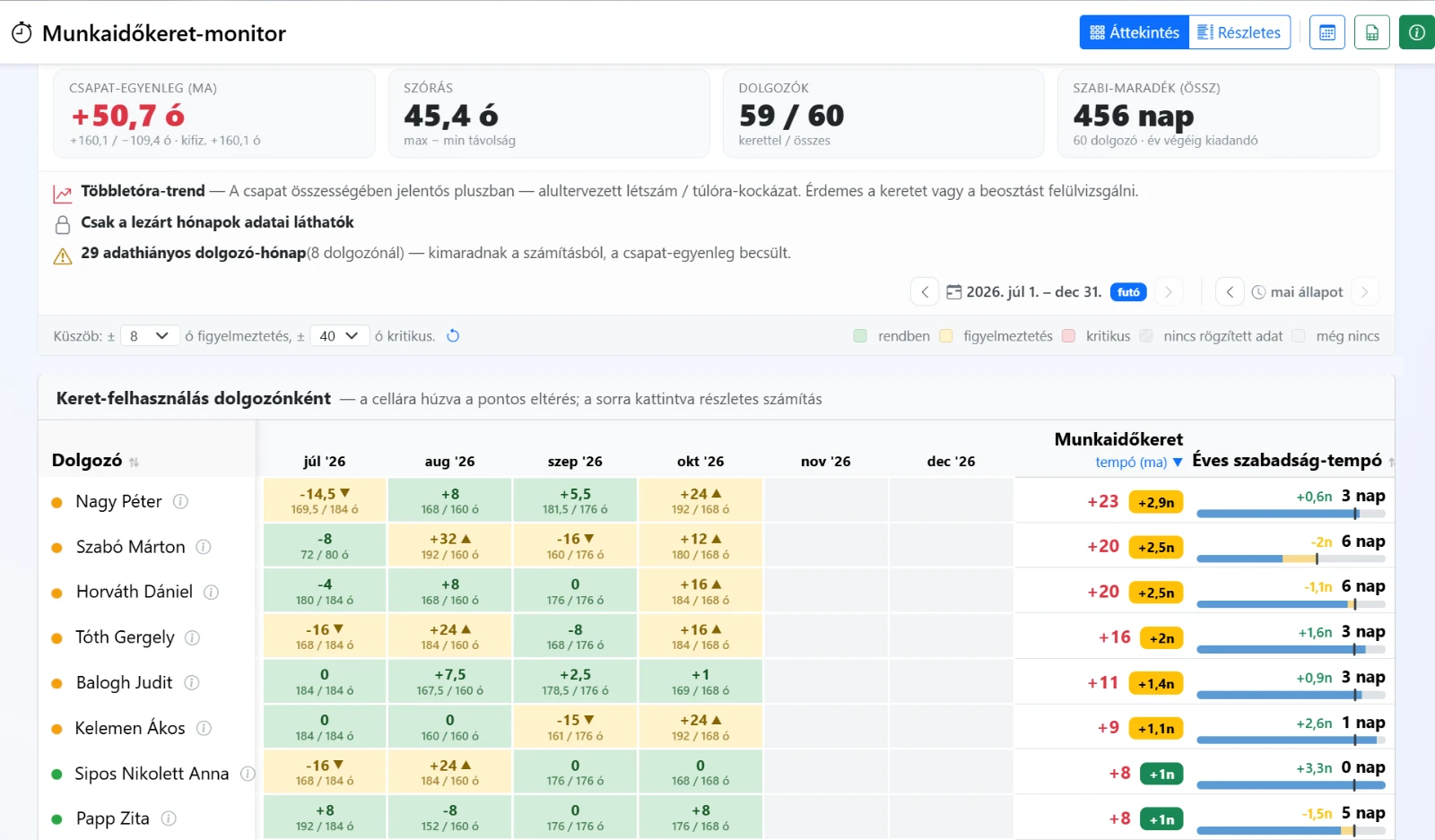
This isn't a timesheet. It's a manager's screen that tracks, across the configured working time frame, who stands above or below the pro-rata line. −18 hours in April, +20 in May – yet landing at zero by the period's close: you see in time whether it's on track or off, while you can still act.
- Pro-rata standing across the whole working time frame, per person
- Limit run-out forecast: closes on track or off track
- Differing monthly working days counted in automatically
- Team-level balance and overtime risk in one view
The team balance today, in one number.
What a manager wants answered each morning
Not a report. An answer. oneTiming doesn't just give data – it shows you where to act.
- Limit monitor Who's about to hit overtime? The monitor flags it before anyone crosses the line.
- Limit balance Whose hour-limit is running out? Per-person balance and pace across the whole period – see who'll close above the pro-rata line and who below.
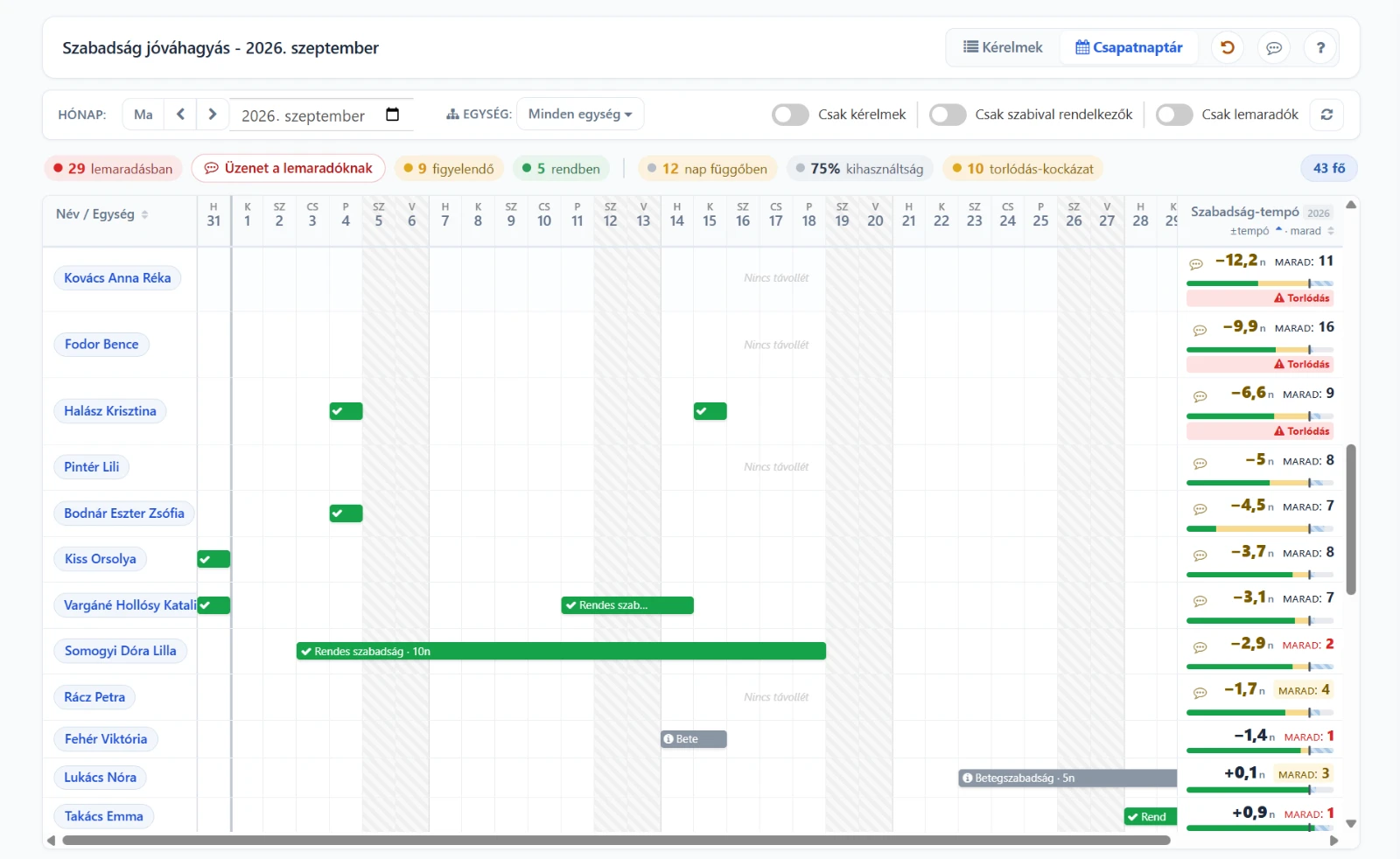
- Team calendar Who hasn't taken their leave? Backlogs on one screen – before they pile up at year-end.
- Approval Will we have enough people next week? Presence-aware approval – see clashes before they happen.
How far the system reaches
- Working time
- Attendance
- Leave
- Approval
- Closing
Not separate records: one process from planning to the payroll export.
Who is oneTiming for?
Three roles, three benefits – recognise in seconds whether it's for you.
Save hours a week on manual limit math.
- Pro-rata limit standing without the manual Excel math
- Fast entry and payroll closing export (XLSX)
- Less manual work, fewer errors
See risk coming, not afterwards.
- Work-hour limits and overtime risk
- Leave balances and backlogs
- Team-level transparency
Know today if you'll have enough people tomorrow.
- Daily presence and capacity
- Absences and leave planning
- Clashes before the shift
Look — don't read.
Three real screens: the frame, the team calendar and leave approval. Click one to look closer.
The limit that warns ahead
Is someone running out of the hours limit — before it becomes a problem?
Who's here, and when?
Who can I schedule, who's away, and where will the shift be short?
Real system screens from oneTiming
If you want to go deeper still
Work schedule patterns, the working time frame and its forecast, part-time, absence types, attendance scanning, approval, reports and the payroll handover.
Take me deeper- One work pattern
- Several shifts
- Several sites
The same system. Just more people.
Two different purposes
The same data can be used two ways: to record what happened — or to see what is going to happen.
Record after the fact
What happened?- Overtime surfaces when the period closes
- The report covers a closed period
- The deviation has to be hunted down
- The limit standing has to be worked out by hand
- The data is on record
Working ahead
What is going to happen?- It speaks up while the period is still open
- It shows in pro-rata terms where the limit is heading
- The deviation surfaces on its own
- The pro-rata limit standing is visible at once
- The data turns into a decision
Frequently asked questions
What HR teams and shift managers ask most often.
Do we need a terminal or an access card?
What is a working time frame, and why isn't a monthly summary enough?
Does it handle several shifts, flexitime and home office?
How does the data reach payroll?
When does a problem become visible?
Ready to use within a week.
With an employee list and the work schedule at hand, the first time tracking can start within a week.
Contact
Email address
info@onelearning.infoPostal address
One Learning Zrt.
1021 Budapest, Budakeszi 51/D C.ép. II/5