More than a frame monitor.
Schedules, frames, rules, absences, approval, recording, month close, payroll export — the way the system does it. The monitor is one screen of it.
Leave today. Multiple shifts tomorrow. Three sites next year. The same system.
How deep shall we go?
Same system. Three depths.
Eight steps from the schedule to payroll.
This is not a feature list. It is the order in which working time moves through the system — and at each step, what the code actually does. What it doesn't do, we don't write down.
-
Schedule
Every employee has a valid schedule: daily and weekly hours, workday pattern, typical shift start and end, breaks. Settings cascade — what is standard for the company need not be set per person — and can be segmented in time: a May schedule change applies from May, and the two segments never overwrite each other.
In the system5 schedule patterns + custom · cascade: employee → role → unit → company · shift presets and multi-day planning from a pattern
-
Working-time frame
The frame length is configured and runs in calendar blocks. The system does not calculate at the end of the frame but every day: where the employee would stand pro rata, and where the frame is heading if things continue this way. Differing monthly workday counts are taken into account.
In the systempro-rata standing · run-out forecast · the month not yet closed does not distort the picture
-
Pro-rata calculation
Partial months, joining or leaving mid-month, a schedule change mid-frame, part-time: all follow the same logic, not manual corrections. The leave quota is prorated too.
In the systemworkday-proportional norm split · join/leave clipping · 8/6/4-hour norms · per-segment calculation
-
Rules and deviations
Labour-law rules are not hard-coded but configured in a table: the value, how severe, whether it blocks saving or only warns. Extra hours (overtime, on-call, standby) sit as a separate layer beside the day, with their own limits.
In the system11 h daily rest · weekly rest day · 12 h/day, 48 h/week · no leave on public holidays · free Sundays per month · frame deviation with two thresholds
-
Absence
Absence types come from data, not code: for each one you set whether it is paid, needs approval, counts against the frame, and which payroll code it carries. Only leave and sick days count in the frame; home office counts as work, not absence.
In the systemleave · sick · unpaid · exemption · other work — flags per type
-
Approval
Single-step: one approver, resolved by the system in cascade — if none is set for the employee, it comes from the role, unit or company level. There is no approval chain or deputy — we say it this way because that is how it is. HR reminds people of unfilled workdays with one click.
In the systemone approver · cascade resolution · reminder for missing days
-
Recording and month close
By hand: day, interval, bulk entry or template copy. By machine: QR scanning from the mobile app, into the same record the frame reads. The month can be closed at two levels: for employees, and for admins too.
In the systemmanual + QR · one table · month lock: employee and admin level, who closed it and when
-
Payroll export
A real, formatted XLSX with several sheets: calendar view, payroll sheet — one row per employee per day, with the absence's payroll code —, signable sheet and frame summary. In a form that external payroll providers have accepted as an import. There is no direct SAP or Nexon integration.
In the systemmulti-sheet XLSX · with filters · printable weekly schedule · payroll code per absence type
It is not the frame monitor that is nice. It is the eight steps underneath that hold.
One employee's limit trajectory
How far ahead or behind — and when does it cross the threshold?
Week by week, the cumulative deviation from the pro-rata trend of the limit: the blue line up to today, the warning and critical thresholds dashed. Below, weekly hours: outline = scheduled, fill = actual.
- the threshold crossing shows ahead, not after the fact
- trend and blip separate at a glance
- the weekly bars show where the surplus came from
Not a number at month-end. A trajectory where the turn shows in time.
This is today. To the right: scheduled hours only.
Look — don't read.
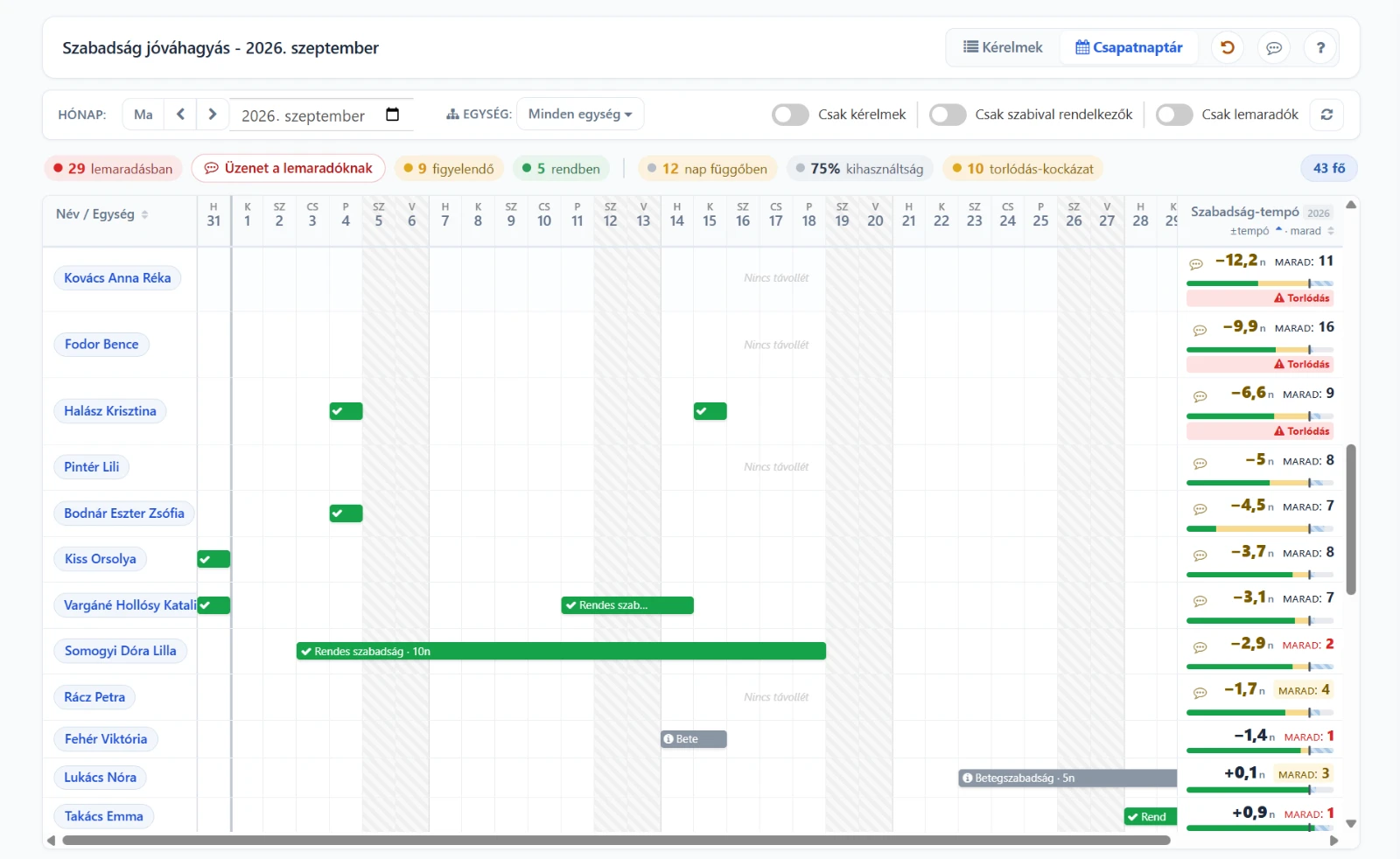
Real oneTiming screens from planning to payroll export — in the order a problem appears, and how you spot it in time.
The limit that warns ahead
Is someone running out of the hours limit — before it becomes a problem?
Who's here, and when?
Who can I schedule, who's away, and where will the shift be short?
What happened — and what goes to payroll?
From actual presence to payroll export, verifiably.
Real system screens from oneTiming
Frequently asked questions
What HR teams and shift managers ask most often.
Do we need a terminal or an access card?
What is a working time frame, and why isn't a monthly summary enough?
Does it handle several shifts, flexitime and home office?
How does the data reach payroll?
When does a problem become visible?
Ready to use within a week.
With an employee list and the work schedule at hand, the first time tracking can start within a week.
HR School is One Solution's strategic partner: offering practical HR support, training, and interim solutions to ensure that system implementation and operations succeed not just technologically, but professionally as well.
Contact
Email address
info@onelearning.infoPostal address
One Learning Zrt.
1021 Budapest, Budakeszi 51/D C.ép. II/5