oneTiming
- Timesheets
- Time tracking
- Absence management
- Automatic reports
Managers shouldn't find out at month-end that something's wrong — they should know today. Overtime, limits and leave on one screen, pro rata, for the whole team.
Leave today. Multiple shifts tomorrow. Three sites next year. The same system.
The same system, in the cloud or on your own servers — still small today, multiple sites tomorrow
The question isn't what the system can do. It's how much work it takes off HR's and managers' shoulders.
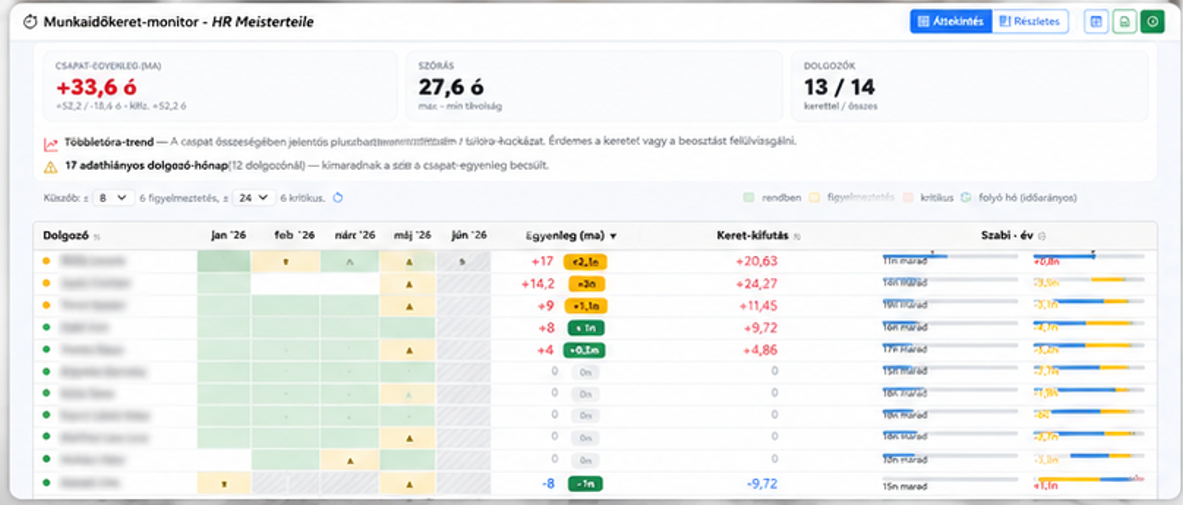
This isn't a timesheet. It's a manager's screen that tracks, across a 1–6 month rolling work-hour limit, who stands above or below the pro-rata line. −18 hours in April, +20 in May – yet landing at zero by the period's close: you see in time whether it's on track or off, while you can still act.
Not a report. An answer. oneTiming doesn't just give data – it shows you where to act.
The monitor flags it before anyone crosses the line.
Limit monitorPer-person balance and pace across the whole period – see who'll close above the pro-rata line and who below.
Limit balanceBacklogs on one screen – before they pile up at year-end.
Team calendarPresence-aware approval – see clashes before they happen.
ApprovalThree roles, three benefits – recognise in seconds whether it's for you.
Real oneTiming screens from planning to payroll export — in the order a problem appears, and how you spot it in time.
Is someone running out of the hours limit — before it becomes a problem?
Who can I schedule, who's away, and where will the shift be short?
From actual presence to payroll export, verifiably.
Real system screens from oneTiming
A traditional attendance system records. oneTiming shows the consequence.
From daily entry to payroll close – tuned to real problems.
Overtime and limit risk in pro-rata terms, across a 1–6 month period – deviations and warnings before the period closes off track.
The whole team's leave plan – balances, backlogs, clashes.
Daily presence, shifts, home office, absences – all feeding the limit and capacity picture.
Leave and overtime approval with context: who's away, what's the presence level.
Filterable reports by status, employee and period – one-click export.
Closed time data goes to payroll as CSV – working time isn't a standalone process.
Supports both cloud (SaaS) and on-site (on-site) deployment. Detailed service models are presented on the oneSolution page.
View details →HR School is One Solution's strategic partner: offering practical HR support, training, and interim solutions to ensure that system implementation and operations succeed not just technologically, but professionally as well.
Because in 25 years we've seen that most HR people don't need more menu items — they need to find information faster, administer less, and coordinate less. So with every change, we ask the same questions:
If yes, it stays. If not, we don't build it.
Fewer month-end reconciliations
Overtime and limits don't surface at closing.
Manager visibility
The whole team's limit and leave standing on one screen.
Cleaner payroll prep
Fewer corrections, fewer errors at close.
Less manual math
Pro-rata limit standing assembles itself, not in Excel.
Simpler leave management
Backlogs and clashes visible in time.
One Learning Zrt.
1021 Budapest, Budakeszi 51/D C.ép. II/5